TL;DR
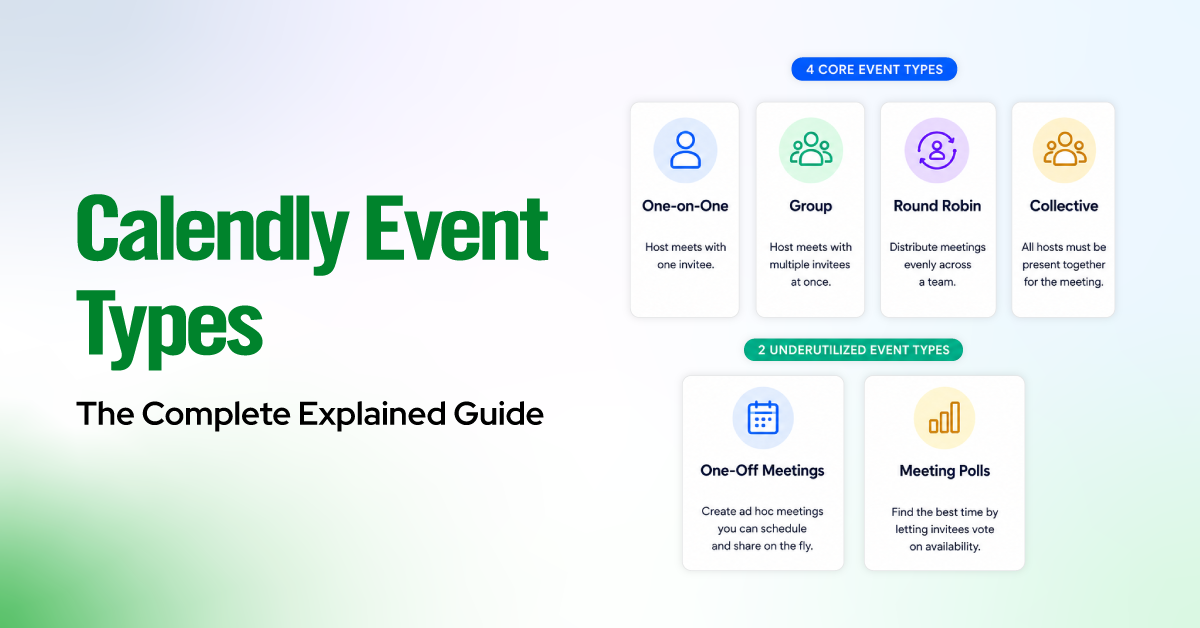
- Calendly has 4 core event types: One-on-One, Group, Round Robin, and Collective.
- It also has 2 underutilized event types: One-Off Meetings and Meeting Polls.
- The right event type depends entirely on your role and use case, not on personal preference.
- Round Robin distributes leads evenly across a sales team. Collective requires all hosts to be present at once.
- Every event type shares the same core settings (name, duration, location, availability) but diverges in how hosts and invitees interact.
- Paid plans unlock the most powerful types: Round Robin, Collective, and Group Events, all of which require a Standard plan or higher.
Most people open Calendly, pick an event type that looks about right, and move on. That decision seems minor until something breaks. A sales rep gets flooded with bookings while another sits idle. A client shows up to a meeting, and the host never got the invite. Your booking page shows almost no available times, even though your calendar is mostly open.
Nine times out of ten, the wrong event type is the reason.
Calendly’s event types are not interchangeable with styles or themes. Each one controls a completely different scheduling logic: who attends, how hosts are assigned, and which time slots even appear to the person booking. Choose the wrong one, and the tool works against you without any obvious error message explaining why.
This guide clearly covers all 6 event types, with simple decision rules for every role and a full walkthrough of the settings that matter.

What Is a Calendly Event Type?
A Calendly event type is a reusable meeting template that defines the scheduling rules for a specific kind of meeting. It controls who hosts the meeting, who can book it, how long it runs, where it takes place, and what happens before and after the booking is confirmed.
Each event type has three core variables that determine its behavior:
- Host configuration: One host, a required set of hosts, or a pool of available hosts
- Invitee configuration: One invitee per slot, or multiple invitees sharing the same slot
- Assignment logic: Invitee chooses a specific host, or the system auto-assigns one
Everything else, including buffers, intake forms, payment, and notifications, is layered on top of these three. Getting these variables right is what separates a functional scheduling setup from one that routes incorrectly or unintentionally blocks availability.
The 4 Core Calendly Event Types You Should Know
1. One-on-One
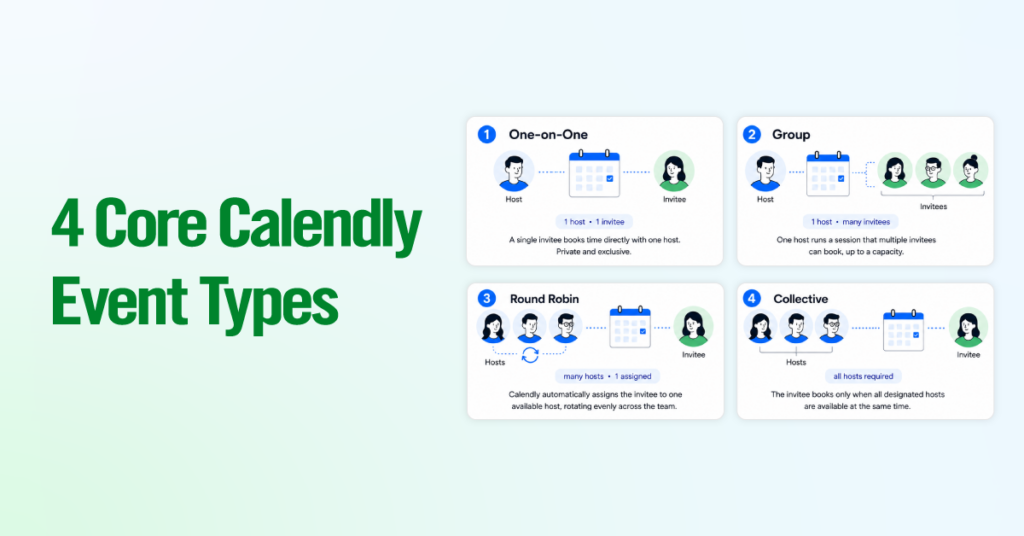
A One-on-One event type connects a single invitee with a single host. It is the default event type and the most commonly used across roles and industries.
When someone books a One-on-One, they see your available time slots based on your calendar and the availability rules you’ve set. No one else can book that same slot. It’s a direct, private meeting between two people.
Best for:
- Client consultations and discovery calls
- 1:1 coaching sessions
- Candidate interviews (single interviewer)
- Customer success check-ins
- Any meeting where the exclusivity of the slot matters
Key characteristic: Only one host is assigned. The invitee books directly into that host’s availability. There is no routing logic and no multi-host coordination required.
2. Group Event
A Group Event allows multiple invitees to book the same single time slot. One host runs one session, and many people can register for it simultaneously, up to a cap you define.
Think of it like a webinar registration or a workshop sign-up. You set up one session for a specific date and time, publish the link, and attendees book their seats until capacity is reached.
Best for:
- Webinars and live demos
- Onboarding sessions run for a cohort of new users
- Training workshops
- Office hours where multiple people join the same call
- Free community events
Key characteristic: One host, one time slot, many invitees. You control the attendee cap. Once the cap is reached, no further bookings are accepted for that slot.
3. Round Robin
Round Robin is a multi-host event type designed for teams. When an invitee books, Calendly automatically assigns them to one available host from a defined pool, rotating through team members to distribute bookings evenly.
The invitee does not choose their host. The system handles assignment based on availability and distribution logic. Calendly supports two distribution modes:
- Optimize for Availability and
- Optimize for Equal Distribution
Availability logic: A slot only appears to the invitee if at least one host is available during that window. If all reps are blocked, the slot disappears entirely.
Best for:
- Sales teams where inbound leads need to reach any available rep
- Support teams handling incoming scheduled requests
- Recruiting teams where any recruiter can run a screening call
- Any scenario where it doesn’t matter which specific team member handles the meeting
Key characteristic: Multiple potential hosts, but only one attends each booking. The system auto-assigns. This is the most scalable event type for team-based scheduling.
4. Collective Event
A Collective event type requires all designated hosts to be available simultaneously before a time slot is offered to the invitee. Every host you add to a Collective event must have an open calendar window for a slot to appear as bookable.
This is the correct choice when the meeting genuinely requires every participant to be present. If even one host is unavailable, that slot is hidden from the invitee’s booking page.
Best for:
- Panel interviews where multiple interviewers must all attend
- Multi-stakeholder sales demos requiring an AE and a solutions engineer
- Joint client reviews with multiple team leads
- Any formal meeting where partial attendance is not an option
Key characteristic: Multiple required hosts, one invitee, and the slot only opens when every host is free. This is the most logistically demanding event type because a single blocked calendar kills available slots.
The critical difference from Round Robin is that Round Robin assigns one host from among many options. Collective requires all hosts at once. These solve completely opposite problems.
2 More Event Types Calendly Doesn’t Make Obvious
One-Off Meeting
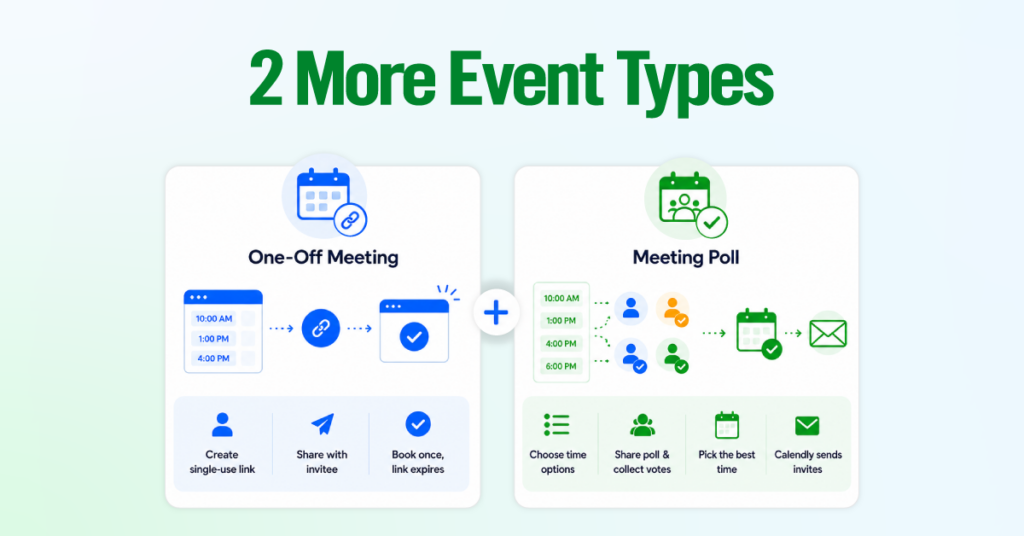
A One-Off Meeting is a single-use meeting link for a specific meeting. You choose the duration, location, host, and time slots, then send a unique link to the invitee. Once the meeting is booked, the link expires and cannot be reused.
This is different from a regular event type because it is not a reusable template. It is built for one specific meeting.
Best for:
- Rescheduling a specific meeting without sharing your main booking link.
- Sending a limited set of time options to a VIP contact.
- Booking a one-time meeting that does not fit your standard event types.
- Offering specific times instead of letting someone browse your full availability.
How to access it:
Calendly > Scheduling > + Create > More ways to meet > One-off Meeting
Meeting Poll
A Meeting Poll lets you suggest multiple time options and ask people to vote on what works for them. No one books right away. After people vote, you choose the best time, and Calendly sends the calendar invites.
This solves the usual group scheduling problem: finding one time that works for several people without sending dozens of emails.
Best for:
- Team meetings where you do not control everyone’s calendar.
- Cross-functional meetings with internal or external stakeholders.
- Planning sessions where attendance needs to be checked before confirming a time.
- Any meeting where group agreement matters more than instant booking.
Key limitation:
Meeting Polls are available on all Calendly plans, but they are slower than a normal booking link because you have to wait for people to vote. They also support up to 40 time slots and 40 participants, and workflows or rescheduling are not currently supported.
How it works:
Calendly > Scheduling > + Create > More ways to meet > Meeting poll
Choose up to 40 time slots, share the poll link, collect votes, select the best time, and Calendly sends the calendar invitations.
Comparison of Calendly Event Types Features
| Event Type | Hosts Required | Invitees Per Slot | Auto-Assignment | Plan Required |
| One-on-One | 1 | 1 | No | Free |
| Group Event | 1 | Multiple (capped) | No | Standard+ |
| Round Robin | Multiple (pool) | 1 per booking | Yes | Standard+ |
| Collective | Multiple (all required) | 1 | No | Standard+ |
| One-Off Meeting | 1 | 1 | No | Free |
| Meeting Poll | 1 or more | Multiple respondents | No | Teams+ |
Which Event Type Should You Use?
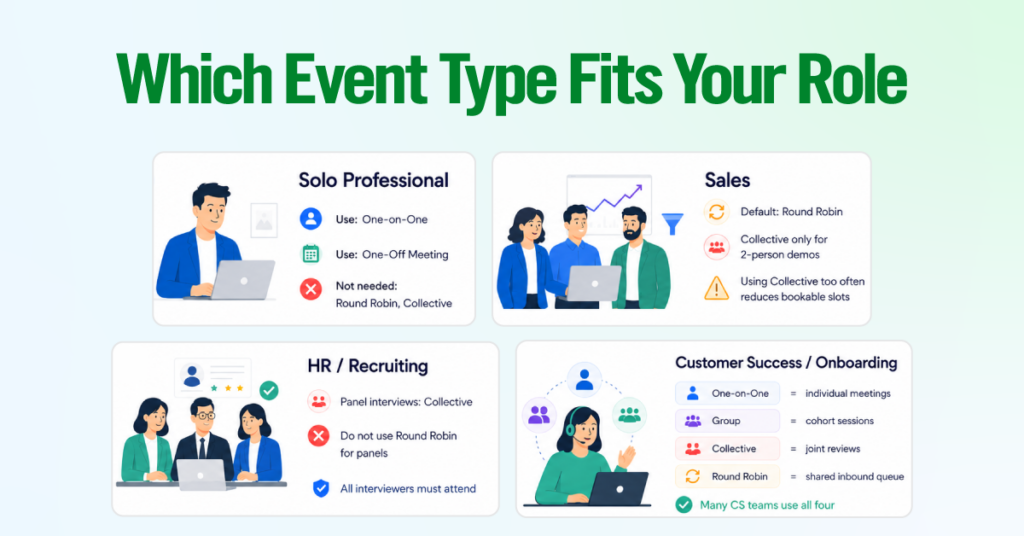
If you’re a solo professional (coach, consultant, freelancer)
- Round Robin and Collective don’t apply; you’re the only host.
- Use One-on-One for standard offerings, One-Off Meeting for anything bespoke or one-time.
If you’re in Sales
- Round Robin is the correct default for all inbound bookings.
- Collective is only for demos where two specific people must both attend simultaneously.
- Using Collective, where Round Robin would work quietly, kills bookable slots whenever a host has a conflict.
If you’re in HR / Recruiting
- Don’t use Round Robin for panel interviews; it assigns one host, not all of them.
- Collective is the only correct choice when every interviewer must be present.
If you’re in Customer Success / Onboarding
- One-on-One for individual meetings, Group Event for cohort sessions, Collective for joint reviews, and Round Robin for shared inbound queues.
- Most CS teams need all four running in parallel.
If you’re an Ops/Admin setting up for a team
- The event type follows the attendance structure, not personal preference.
- Map every meeting type, identify how many hosts are required, and whether they are interchangeable, then assign using the table above.
Key Settings to Configure for Every Event Type
Before publishing, configure these essential settings to ensure a smooth and consistent booking experience.
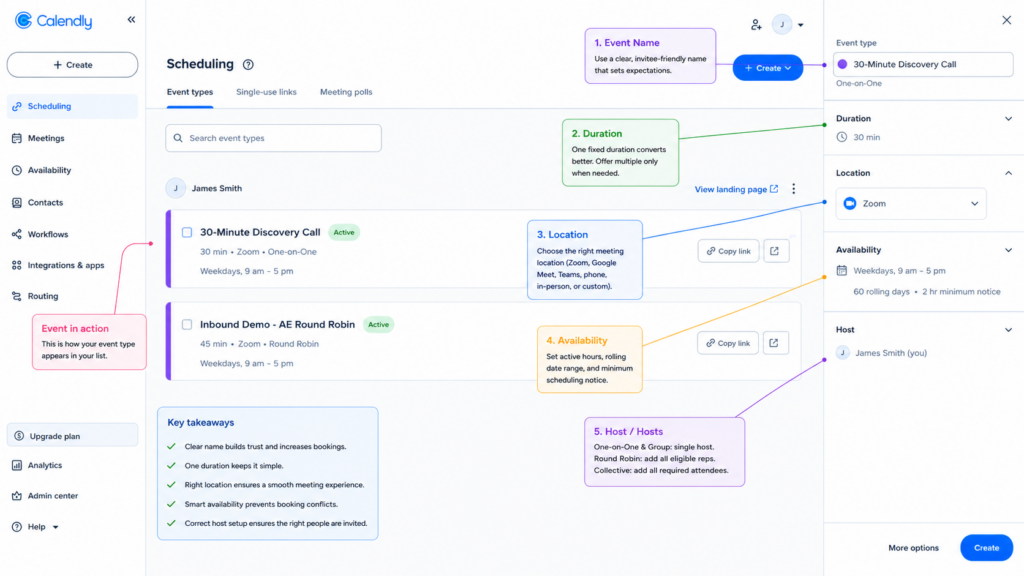
Event Name
Name from the invitee’s perspective. “30-Minute Discovery Call” outperforms “Sales Call” every time. For team event types, be specific enough that any admin understands the function: “Inbound Demo – AE Round Robin,” not “Demo.”
Durations
You can offer multiple durations under one event type link. In most cases, one fixed duration converts better. Multi-duration works well when the invitee genuinely needs to self-select, such as tiered coaching packages where price and time are linked.
Locations
Calendly supports Zoom, Google Meet, Microsoft Teams, Webex, phone, in-person, and custom links. For Round Robin and Collective event types, every host must have the relevant conferencing tool connected, or their slots won’t generate functional meeting links.
Availability
Set active booking hours, a rolling date window, and a minimum scheduling notice. For Round Robin, a slot appears only when at least one host is free. For Collective, all hosts must be free simultaneously.
Hosts
- Round Robin: Add all eligible reps. Mark hosts Active or Inactive to manage rotation without removing them, which is useful for vacation coverage.
- Collective: Add all required attendees. Any single calendar conflict removes that slot entirely.
- Group Event: Single host only from Calendly’s scheduling logic standpoint.
Advanced Customization Options (More Options)
Descriptions appear on your public booking page. Set clear expectations about what the meeting covers and what the invitee should prepare. For team event types, use it to route the wrong audience to the right audience before they book.
Limits and Buffers
- Buffers: Block time before or after meetings; not visible to invitees.
- Daily booking limits: Cap daily bookings to prevent overload.
- Minimum notice: Set at least 2 hours for same-day, 24 hours if you need prep time.
- Limit future bookings: Rolling 30 or 60-day windows reduce distant no-shows.
Free/Busy Rules
Calendly hides slots marked Busy on your connected calendar. Connect every calendar where you have real commitments. For Round Robin teams, each host should mark personal appointments as Busy to prevent double-booking.
Booking Page Options
- Display name and photo, event color, and booking page language are cosmetic but build trust.
- Allow invitees to add guests: Useful for demos; enable deliberately, as it changes the meeting dynamic.
- Hide from main booking page: Use for event types distributed by direct link only.
The Invite Form
Name and Email are pre-filled. Add custom questions sparingly: each required field reduces booking conversion. For sales, one or two qualifying questions (company size, use case) is the ceiling. For HR, collect the resume link or the role applied for.
Payment
Stripe and PayPal integrations collect payment before the booking is confirmed. Calendly takes no cut; standard processor fees apply. Refunds must be handled directly in your payment processor.
Notifications and Workflows
Configure email confirmations, pre-meeting reminders, SMS reminders, post-meeting follow-ups, and cancel/reschedule alerts. A 24-hour and a 1-hour reminder sequence meaningfully reduces no-shows for any event type where missed meetings carry a real cost.
Confirmation Page
Three options: Calendly’s default, a custom message, or an external redirect URL. For sales, redirect to a “what happens next” page. For coaching and consulting, redirect to an intake form so you have everything before the session starts.
Conclusion
Calendly event types are not interchangeable. Each one is built for a specific scheduling situation. When you choose the wrong one, Calendly creates the exact problems it is supposed to prevent: hidden availability, wrong host assignments, extra follow-ups, and manual rescheduling.
The decision is simple. Ask three questions: how many hosts need to attend, whether a specific host is required, and how many invitees can share the same time slot. Those answers will point you to the right event type.
Once the event type is correct, set the basics carefully: duration, location, availability, and hosts. Then add advanced settings such as buffers, workflows, intake forms, and confirmation redirects to match your actual process.
The two event types most teams overlook are Collective and Meeting Poll. A collective is best when multiple specific people must attend the same meeting. Meeting Poll is best when a group needs to agree on a time before the meeting is confirmed.
If you are setting up Calendly for a team, map your meeting types before publishing any links. Choose the right event type for each meeting, build the workflows, and then launch. Getting this right early prevents hours of rescheduling and follow-up later.