
If you sell consultations, coaching sessions, audits, workshops, or implementation calls, asking people to pay before they confirm an appointment can transform your workflow. It removes awkward payment follow-up, filters out no-show prospects, and makes your scheduling process feel professional from the first click.
For service businesses, Calendly makes this easier by letting you connect payment tools directly to qualifying event types. Instead of emailing an invoice after someone books, you can collect payment during the booking flow and confirm the meeting only after the transaction is complete.
For small businesses, consultants, agencies, and independent professionals, that single change improves cash flow and protects calendar space. When a client pays in advance, they are more invested in showing up prepared. That means fewer empty hours, less administrative chasing, and a smoother client experience. If your website already brings in qualified leads, adding payments to your Calendly process can turn that traffic into actual revenue faster.
How Calendly payments work
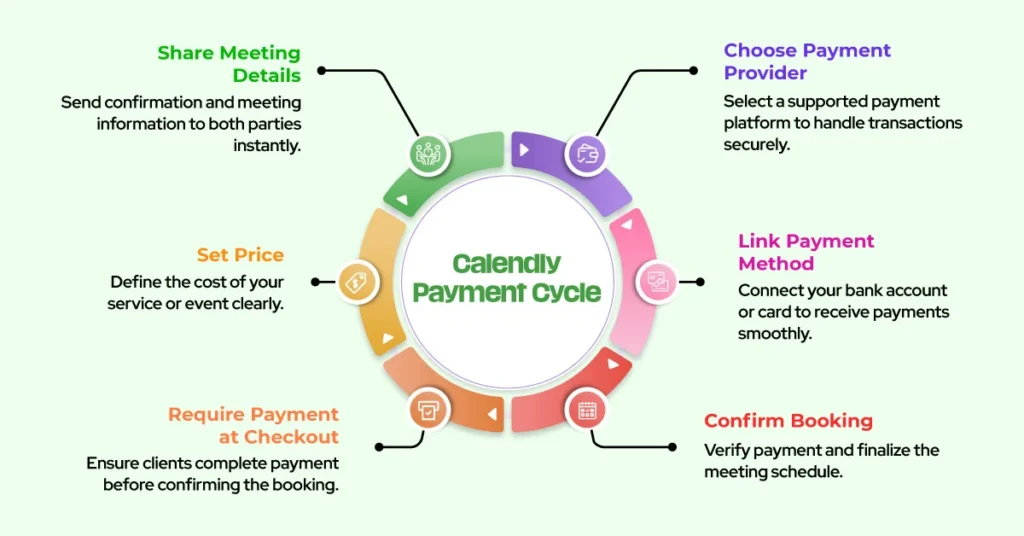
Calendly lets you connect supported payment providers so clients can pay when they book selected event types. In practice, that means you choose a paid service, set your price, link the payment method, and require payment at checkout. Once the payment goes through, the booking is confirmed and both sides receive the meeting details.

This setup works best for fixed-price offers. Examples include discovery calls with strategy included, one-off consulting sessions, coaching intensives, office hours, implementation calls, or paid training. It is not always the right fit for custom projects with variable pricing, but it works extremely well for standardized sessions that are easy to package and explain.
Step 1: Decide which services should be prepaid
Before you connect any payment tool, decide which meetings deserve a price tag inside Calendly. Not every event type should require payment. A paid consulting session makes sense. A free intro call may still be useful if you use it to qualify leads. Your goal is to create a service ladder.
For example, you might offer a free fifteen-minute fit call, a paid sixty-minute strategy session, and a premium implementation workshop. This creates a clear path for buyers and helps you separate curious visitors from serious clients. It also prevents sticker shock because every meeting has a defined purpose.
Step 2: Create or refine your event type
Open Calendly and create a dedicated event type for the paid session. Give it a specific title that reflects the outcome, not just the duration. “Website Funnel Strategy Session” is stronger than “60-Minute Call.” Add a concise description explaining who it is for, what is included, and what the client should prepare before the session.
Keep the duration realistic. If you need ten minutes before or after the call, add buffers. If you only want these meetings on certain days, restrict availability. Paid bookings work best when your calendar rules are tight. That way clients only see slots you actually want to sell.
Step 3: Connect your payment provider
In the event settings, connect the payment option available in your Calendly plan. Follow the prompts to authorize the provider and map it to the event type. Then enter the amount, confirm the currency, and make sure payment is required for booking.
Use a fixed price whenever possible. Fixed pricing is easier to explain, easier to market, and easier for buyers to approve. If you serve international clients, check that your pricing and currency are consistent across your site, sales emails, and booking page.
Step 4: Clarify what the client is buying
The payment screen should never surprise people. On the booking page, repeat the outcome, deliverables, duration, and any policies that matter. Tell clients whether the session includes a recording, a written action plan, follow-up support, or implementation guidance.
Also state your rescheduling and cancellation policy in plain language. That reduces disputes and gives buyers confidence. If a session is nonrefundable, say so clearly before checkout. If one reschedule is allowed, explain the window.
Step 5: Add questions that improve delivery
Use intake questions wisely. Ask only what helps you make the session better. Good questions include business type, website URL, main challenge, preferred tools, or the single outcome they want from the call. These details help you prepare and increase perceived value.
Avoid turning the booking form into a homework assignment. Too many fields reduce conversions. Keep it focused, helpful, and aligned with the offer.
Best practices to increase paid bookings
First, sell outcomes, not time. People do not want sixty minutes on your calendar. They want clarity, strategy, fixes, or momentum. Second, match your booking page language to the promise on your website. Consistency increases trust. Third, add confirmation and reminder emails that restate the value of the session and tell clients how to prepare. Fourth, test your own booking flow from start to finish so you can catch friction before prospects do.
It also helps to place your Calendly payment link in the right places: service pages, proposal emails, onboarding emails, and follow-up messages after discovery calls. The easier it is to find the paid option, the faster interest becomes revenue.
Common mistakes to avoid
One common mistake is charging for a vague call with no clear result. Another is mixing free and paid language on the same page, which confuses buyers. Businesses also lose conversions when they offer too many event types, collect too much information, or fail to explain policies.
Another avoidable problem is poor calendar design. If your paid event can be booked at inconvenient times, you may resent the meetings you sold. Strong availability rules protect both profit and energy.
When to get help
If you want a cleaner monetization setup, a Calendly consultant can help you structure event types, connect payments, refine routing, and improve the full booking journey. That matters when your scheduling system is part of your sales process, not just a convenience feature.
Final thoughts
Accepting payments on Calendly is one of the fastest ways to turn scheduling into a revenue system. When clients pay before they book, your process becomes clearer, your calendar becomes more protected, and your service business runs with less friction. Build paid event types around defined outcomes, keep your booking experience simple, and make every confirmation feel polished. Done well, Calendly stops being just a scheduler and becomes a reliable part of how you sell your expertise.